
8-bit game maker: make an 8-bit game with AI
Describe a game and Shiny Gen builds it for the Game Boy Color, the 8-bit handheld, with four-color palettes, a 160 by 144 screen, and chiptune made from four sound voices. Play it in a browser right away, and export a real .gbc ROM when you want one.
You can make and play 8-bit games for free. Only downloading the ROM needs a purchase, from $2.99.
What an 8-bit game is, in practice
The label comes from the processors of the 1980s and early 1990s, which handled data eight bits at a time. People use it more loosely now for a whole style: blocky characters, a handful of colors, and beepy music. A real 8-bit game is not just a drawing style, though. The machine's limits shape everything the player sees and hears.
The 8-bit machine our engine builds for is the Game Boy Color. Its processor works in eight bits, and the engine keeps your game inside the same walls: its screen, its palettes, its sprite count, and its four sound voices. There is no NES engine, so if you need a game for that exact console, this is not it.
You do not have to know the hardware. Describe the game and the AI writes the program, draws tiles that fit the palettes, composes a tune, and plays the result.
The 8-bit limits you build inside
These are the real numbers of the Game Boy Color engine. They are the reason an 8-bit game looks the way it does, and the build tells you how full the cartridge is, so a limit appears before it turns into a bug.
| Part | Limit | What it does to the look |
|---|---|---|
| Screen | 160 by 144 pixels | Small rooms, big tiles, short menus |
| Color | Eight palettes for backgrounds, eight for sprites, four colors each | A tile can only use four colors, so scenes feel unified |
| Sprites | 40 on screen, ten per scanline | Enemies are few, and flicker is a hazard to design around |
| Sound | Four voices: two pulse, one wave, one noise | Melody and bass in beeps, drums in noise |
| Cartridge | 64 KB | Small games, tightly made |
A picture with too many colors is fitted to the palettes. The image editor has a Game Boy Color preview that shows how it will look before you build.
The chiptune sound is four voices
8-bit music is not a style applied to a recording. It is written for a short list of channels, and each one has a job. Two pulse channels carry the lead melody and the harmony, and you can hear the different tones that come from changing how wide each pulse is. The wave channel holds a bass line or a soft lead. The noise channel makes drums, hits, and explosions.
When you ask the agent for music, it writes for those four voices. A request such as a tense two-voice melody over a low bass pulse is a fair way to describe a track, and you can ask for it to be faster, brighter, or shorter. Sound effects, like a jump or a coin, come from the same voices.
Make an 8-bit game in four steps
- Start on the Game Boy Color engine. In Shiny Gen press +, choose New, then GBC. The cartridge begins blank on purpose so the AI has a clean start.
- Say what the game is. A platformer with one jump, a maze with a ghost, a fishing game. Mention the mood and the tune you want.
- Let it build and play itself. The agent builds the cartridge, presses the virtual buttons, and corrects what fails, so you start from something that runs.
- Tune it. Ask for another level, a harder enemy, or a new beat. The code is open if you like reading it, and editing by hand costs nothing.
8-bit games from the catalogue
Each of these runs on the Game Boy Color engine and was made by the agent. They are shown at the machine's real 160 by 144 size, scaled in whole steps.
- Game Boy Color
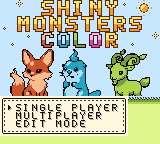
Shiny Monsters Color
A young monster and a stolen Prism: win it back and the world gets its color again.
 Game Boy Color
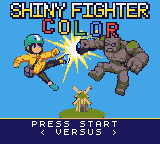
Shiny Fighter Color
A platform fighter with eight fighters, from a parcel courier to a chef.
 Game Boy Color
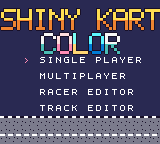
Shiny Kart Color
Race tinker-bots in three-wheel buggies around three tracks from above.
 Game Boy Color
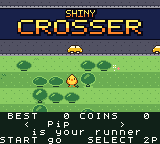
Shiny Crosser
A runner game that you can play for coins and a best score, alone or with a friend.
 Game Boy Color
Shiny Village Color
A tiny village with a lighthouse, with a start menu for a new village or one with a friend.
 Game Boy Color
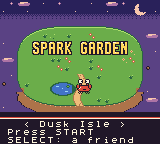
Spark Garden
A small crab gathers sparks on Dusk Isle, with a friend mode on the Select button.
Beyond the browser: a real ROM
You can play an 8-bit game in a browser from the first minute. When you want it outside the browser, the engine saves a .gbc ROM. Open it in an emulator such as mGBA on a computer or Delta on an iPhone, or copy it to a flash cart for a real handheld.
We have run exported Game Boy Color files on a Game Boy Advance and on a ModRetro Chromatic through flash carts. Exporting is the only part that needs a purchase. See the Game Boy Color guide for how the engine works, and the ROM export walkthrough for the file steps.
Free, gems, and the one purchase
Free
Starting a game, playing it, and sharing a link. Hand-editing code is free as well.
Gems
Asking the AI to write code, tiles, or tunes. New accounts begin with gems and a few free turns, then a free daily prompt.
One purchase
Downloading the .gbc file. Any purchase from $2.99 unlocks export one time.
See the pricing page for current packs.
8-bit game maker questions
What is an 8-bit game maker?
A tool for making games in the style of 8-bit consoles: small screens, short color lists, and chiptune sound. Shiny Gen's Game Boy Color engine goes further and builds inside the actual limits of that 8-bit machine.
Can I make an 8-bit game with AI?
Yes. You describe the game and the AI writes it, draws tiles that fit the palettes, composes a chiptune tune, and tests it before you play. You can keep changing it by chat.
Can it make a NES game?
No. There is no NES engine. The 8-bit target is the Game Boy Color, and the Game Boy Advance engine is there for a step up in colors and sound. The Godot engine can imitate the 8-bit look but does not enforce the hardware limits.
How is the 8-bit music made?
The Game Boy Color engine has four sound voices: two pulse channels, one wave channel, and one noise channel. The agent writes music and sound effects for those voices, so it sounds like chiptune because it is built that way.
Can I export an 8-bit game as a ROM?
Yes. The Game Boy Color engine saves a .gbc file that plays in emulators and, through a flash cart, on real handhelds. Export needs any one purchase from $2.99.
Is there a free 8-bit game maker?
Starting, playing, and sharing cost nothing. AI generation uses gems, with free gems and a daily free prompt for each account. Only the ROM download needs a purchase.
Do I need to code to make 8-bit games?
No. The agent writes and fixes the code. If you do like reading it, the whole game is one C-like source file you can open and edit.
Get that 8-bit beep in a game of your own
Pick the Game Boy Color engine, say what your game is, and hear it play in a minute.